|
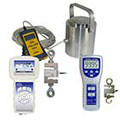
Force Gauges Force gauges for laboratories, for measuring situational and educational purposes are available on our website. Force gauges can be used for several different types of tasks, be it tensile testing, force testing, compression testing or measuring force. This is why they are used across all kinds of industries. The purpose of such tools is to measure the force during a push or pull test usually in newtons or in pounds. Our force gauges offer high levels of accuracy and come in both analogue and digital forms. You can also log the readings on some devices and store them for later analysis to gain information that is not necessarily easy to see at first such as differential and integral qualities. Some of the force gauges also have RS232 cables so that the results logged can be taken onto a computer for software analysis. Force gauges typically work by deforming either a digital load cell or a strain gauge in the digital load cell the force inflicted is converted into an electrical signal which will then be able to be recognized as a force upon the load cell. The Mechanical force gauges use a strain gauge that will give an analogue reading for the parameter being measured. Force Gauges are extremely useful for measuring the maximum force that can be exerted on a material by measuring the peak force to determine whether a part is of high quality or not. Like all our product these smart gadgets have a very high accuracy which makes it easy to get perfect measuring results. In addition to that we offer a wide variety of such measuring devices. The measuring area ranges form 0 Newton to 3.000
kN. Besides the digital devices we also offer mechanical ones. As an additional feature most of our instruments have an internal memory which makes it easy to store your results after the measurements have been made. If you have any questions, our engineers and technicians will be happy to help you with the force gauges, and of course, with the other products in the field of regulation and control, scales and balances.
Here
you can select the main groups of our Force Gauges. By choosing one
group, you will be directed to the corresponding Force Gauges:
Here you can see force gauges from
these companies:
     
      
Technical specifications for our Force Gauges can be found at the following links:
|
|
Digital Force Gauges
|
Digital
Force Gauges
|
To the top
|
|
- Force Gauges PCE-FM series (Force gauges up to 200N, accurate, economical)
|
  |
|
- Force Gauges
PCE-DFG 500 (for traction and compressive force
up to 500 N, incl. Software)
|
  |
|
- Force Gauges FH series (Force gauges with internal loading cell, 0 ... 500 N measuring range, large display, mobile)
|
  |
|
- Force Gauges
PCE-FG series (Force gauges for measuring traction and compression, 50, 200 and 500 N, PEAK function)
|
  |
|
-
Force Gauges FL-Premium series (Force gauges for small forces up to 1 N, graphic display, mobile and handy)
|
  |
|
- Force Gauges PCE-FM1000 (Force gauges up to 1000N, external dynamometric cell)
|
  |
|
- Force Gauges
FH-EXT series (Force gauges with external loading cell, high resolution, 20 ...
500 N)
|
  |
|
- Force Gauges FK series (Force gauges with robust cover, 10 N ... 1
kN, small and mobile)
|
  |
|
- Force Gauges
FH-K series (Force gauges with external loading cell, 200 ... 500
kN)
|
  |
|
- Force Gauges
FH-K series (Force gauges with external loading cell, 1 ... 100 kN)
|
  |
|
- Force Gauges
PCE-FG K series (Force gauges traction and compression, internal memory, external cell, 1.000...20.000 N)
|
  |
|
- Force Gauges SM series (Transducers with display for measuring traction and compression, ranges 50 ... 250 Newton)
|
  |
|
- Force
Gauges PCE-FB series
(Force Gauges with internal memory, SD card, PEAK function, USB
interface)
|
  |
|
- Force Gauges
EF-AE series (Force gauges for compression with software and USB interface, maximum 50
kN)
|
  |
|
- Force Gauges
EF-AE-S series (Force gauges for traction and and USB interface, maximum 50
kN)
|
  |
|
- Force Gauges
MLE-F series (To be mounted on
MLE-F 5/10/20, to measure compression force from 4x5 to 4x20)
|
  |
|
- Force Gauges
HF-AE series (Force gauges to measure compression forces from 500kN to 3000
kN)
|
  |
|
- Force Gauges
FH 1M (Force gauges with huge measuring range from 200 ... 500
kN)
|
  |
|
- Force
Gauges TZL
(Force gauges up to 20 t (max), kg, t, lbs, to, kN, long duration of battery of 200 h)
|
  |
|
- Force
Gauges TZR
(Force gauges with external display of results, stable construction, up
to 20 t (max, kg, t, lbs, to, kN)
|
  |
|
|
Force is defined as any influence that causes a changing of an object, be it its direction, movement or geometrical construction. Since force possesses both, magnitude and direction, it can be seen as a vector. Mostly, a force pushes or pulls something. The most common forces are the weight force and the gravitational force which go hand in hand. Where the gravitational force does not change on the earth, different weight forces can be measured with the help of force gauges of PCE Deutschland GmbH. Applications of use for force gauges are practically unlimited. Our Force gauges provide a quick and reliable way to obtain a measure of force in tension and compression. We offer a comprehensive range of mechanical and digital force gauges with capacities from 1 N to 3000
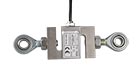
kN. All our Force gauges are supplied with standard accessories, a two year warranty, and can be use d for force testing in hand held or test stand applications. Apart from measuring maximum force of a tear or a break, with the help of force gauges, it can determine the temporal discourse of force. To do this, an optional software pack is required and the LTS-20 manual test position. To the right you can see a photograph showing the combination of these devices. The PCE-FM series of force gauges can determine many measurement values, but the software is able to transfer this data, one value every 2 seconds. If a higher transfer rate is required, Windows hyper terminal can be used. The picture on the left shows the external s-shaped dynamometric cell of the PCE-FG K series force gauge. Due to its two shackles, the dynamometric cell can be installed between two objects. After that, the built-in sensor can determine the active forces and transmit the measured values to the force gauge via the sensor
cable. The picture on the right shows the use of a force gauge in combination with the PCE-LTS20 test position and the optional software pack. Attaching the force gauge to the test position eliminates many potential errors and inaccuracies during the measurement and allows the performing of accurate and repeatable tests. Afterwards the measured data can be
transferred to a computer via a data cable, where the values can be stored and analyzed by using the optional software pack. Please call our offices on: +44 (0)2380 987030 if you have any questions regarding the software or about transferring data to a computer. An ISO calibration certificate can be acquired with our force gauges. It includes a control document containing the company contact details consisting on a laboratory calibration and a certification to meet DIN ISO 9000 standards. This means that our force gauges meet the minimum requirements of the national body of measurement and it can be included in your internal set of measuring instruments. The following link has information about: Calibration certificates for force gauges. There are different kinds of forces that can be measured. The one is the tension force and the other one is the compressive force. For force measurements you need to know what the difference between tensile and compressive force is. The tensile force is the force that applies when you hold an object on two opposite sites and start stretching it. The compressive force is measured when a certain product is pressed together (compressed).
|
|
|
Above
you can see a table where you are able to put in your data and transfer it into
the needed parameter. It is made very simple and comfortable for you and there
is no manual calculation from you demanded. You can simply insert the number you
need to calculate, press the 'Calculate' button below the left site of the
table. After having finished that calculation you will be able to make
additional calculations by simply pressing the 'Clear' button below the
right-hand side of the table. All values within the table will be reset. The
calculation-table can be used in both directions. This means that you are able
to calculate from the right side to the left side and vice versa.
|